
Azure cost, explained — for finance and cloud teams
Know what Azure costs. And exactly why.
Daily spend down to the resource, RI vs pay-as-you-go, BOQ vs actual and customer billing — in one place, read with your own Azure permissions.
Follow the compute cost
Trace a VM cost change to its resource, running hours and billing meter.
Explore the workflowIllustration only — the app shows figures from your own Azure account.
Reads directly from Microsoft services
- Cost Management
- Resource Graph
- Activity Log
- Microsoft Entra
- Azure Advisor
- Microsoft Defender
Take a closer look
A clearer picture.
A more useful next step.
Choose a workflow to explore how Cloudledger connects the bill, the resource and the context.
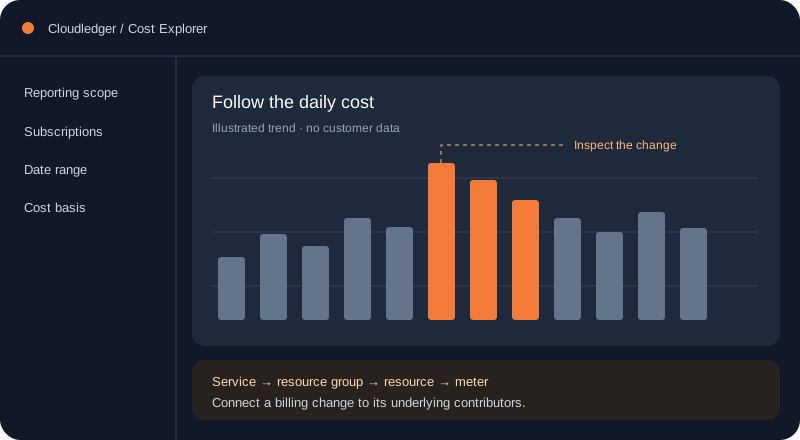
01 / Explore the workflow
See where the change starts.
Start with a daily cost change, then inspect the services, resource groups and meters behind it.
- Compare reporting periods
- Inspect daily contributors
- See RI and pay-as-you-go split
Product illustrations. Connect Azure to see your own data.
How it works
A clear path from sign-in to insight.
Nothing to deploy and no agent to install. Azure permissions and data availability determine which reports you can open.
- 01
Sign in with Microsoft
No new password and no account to create. You sign in with the work account you already use for Azure, through Microsoft Entra.
- 02
Connect a tenant
Point the app at the tenant you want to read. It uses your own delegated permissions, so it can never see more of Azure than you can.
- 03
Start a review
Cost, running resources, changes and access — read from Azure when you ask, rather than from a copy that drifts.
Features
Understand your cloud bill, down to the resource.
Built for finance and cloud teams. Every figure comes from your own Azure account.
Cost dashboard
Pay-as-you-go, reserved (RI) and total spend at a glance, with a daily or monthly graph split by service.
Day by day
Click any day to see every resource billed on it, and leave a dated note so your team knows why it moved.
Group any way
Split spend by service, subscription, resource group, meter or payment type — daily or monthly.
RI, PAYG and DR / ASR
Billing categories read from Azure’s own pricing model, down to each resource and meter.
BOQ vs actual
Upload a Pricing Calculator estimate and see, in plain words, where you paid more or less than planned.
Azure Billing workspace
Customer ledgers, invoices and profit / loss per customer, with cloud-stored documents.
Estate
Anomalies, change tracking, activity, idle VMs and orphaned resources, with admin-only actions.
Access & security
Unused or risky access, Advisor, Defender, policy and network — with a change history.
Plus a read-only assistant on every page
Ask about your spend in plain words. It answers only from your subscriptions and costs, says “Not available” instead of guessing, and cannot change anything.
Security
What it can and cannot do.
Worth reading before you connect a tenant. These are constraints in the code, not promises in a policy.
Your permissions, not ours
Every call to Azure is made with your own delegated token. If Azure would refuse you, it refuses the app. No service principal quietly holds more access than the person using it.
Admin-only changes
Reporting only reads. Anything that changes Azure — resize, delete, revoke, build — is limited to workspace admins, previewed first and needs explicit confirmation.
Uploads are not kept
A BOQ spreadsheet travels with the request that parses it and is never written to disk. Text inside a cell is treated as data, never as an instruction.
Bring your own model
Point the assistant at your own OpenAI or Azure OpenAI endpoint. It runs on your key, your quota and your data agreement, and stops at the daily limit you set.
Learning centre
Learn to read your Azure bill.
23 practical guides on investigating cost changes, reservation billing, rightsizing and monthly reviews.
FAQ
Questions people actually ask.
Does it change anything in my Azure account?
Reporting and cost exploration are read-only. Build can create supported Azure resources, but requires explicit confirmation, workspace-admin authorization and sufficient Azure permissions. Review generated templates and deployment details before creating resources.
What does it cost to run?
The app reads the Azure Cost Management and Resource Graph APIs, which Microsoft does not charge for. If you connect a model endpoint for the assistant, that is billed by your own provider against your own key.
Can I use it across more than one tenant?
Yes. Connect each tenant you have access to and switch between them from the top bar. Data from one is never mixed into another.
Where do the numbers come from?
Billed costs come from Azure Cost Management. Resource inventory and findings come from the relevant Azure services. Forecasts, retail-price estimates and optimization projections are distinct from billed actuals. Check the reporting period, freshness and any partial-data messages.
Can my colleagues use it?
You can invite people from your directory and choose what each of them is allowed to do. Roles are checked on the server, not just hidden in the menu.
See your own numbers.
Sign in with your work account, connect a tenant, and start with a read-only cost review.